
You can add multiple certifications of all types but only an NREMT, State EMS Certification, FP-C, CCP-C, or CCEMTP will generate a training plan.
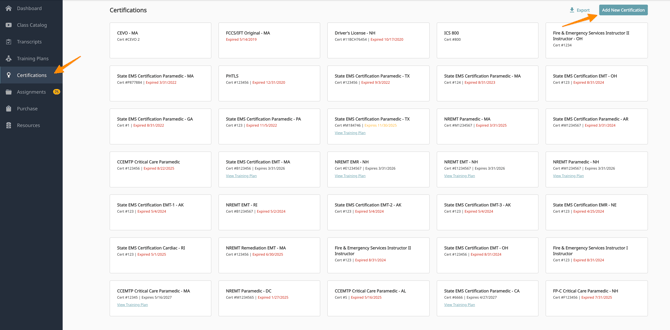
- First click on the “Certifications” tab on Prodigy
- Next click Add New Certification in the upper right hand corner
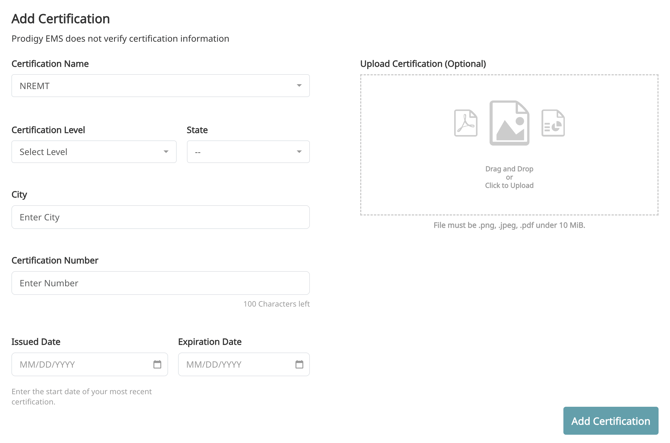
- City - This should be your home city, this is a field required by CAPCE.
- State - This is the state you practice in, even for NREMT it will drive Local requirements.
- Certification number - This is your standard certification number. For NREMT make sure to add the letter at the beginning of your number.
- Issued Date - This is the date you received your most current certification. For NREMT this can be found on your NREMT profile page. If you are unsure, you can add your last expiration date. (EXAMPLE: you expire on 3/31/2027, you can use 3/31/2025 as your initial date if you renewed on time).
- Expiration Date - The date your certification expires.
- Depending on your certification, some fields may be listed as optional.
Training plans will only populate if your certification is current. If your certification is expired, you must use a date in the future to generate a plan.
Prodigy counts all training between your initial date and expiration for your current recertification.
A training plan will only populate if you have a certification in the system that is not expired. If your certification is expired, please contact us and we will get you set up on the appropriate plan. Support@prodigyems.com